It started as the wrong tool.
The first idea was a director desk for action notes. That would have been another place to write down animation names and frame numbers. It would not tell you whether a six-tick startup feels better than a ten-tick startup.
The real problem appears after an attack already works. You change two numbers in a script, restart the game, perform the move again, and compare it with what you remember. If the new version is worse, you try to reconstruct the old one. Camera shake, sound, movement, hitboxes, and cancel timing may live in different files, so one small combat change turns into a code search.
Action Director keeps those timing decisions in one visible action file. It does not replace your game. It gives you a faster place to compare the versions before you wire the chosen timing into production systems.
What changes when you use it.
You stop comparing from memory
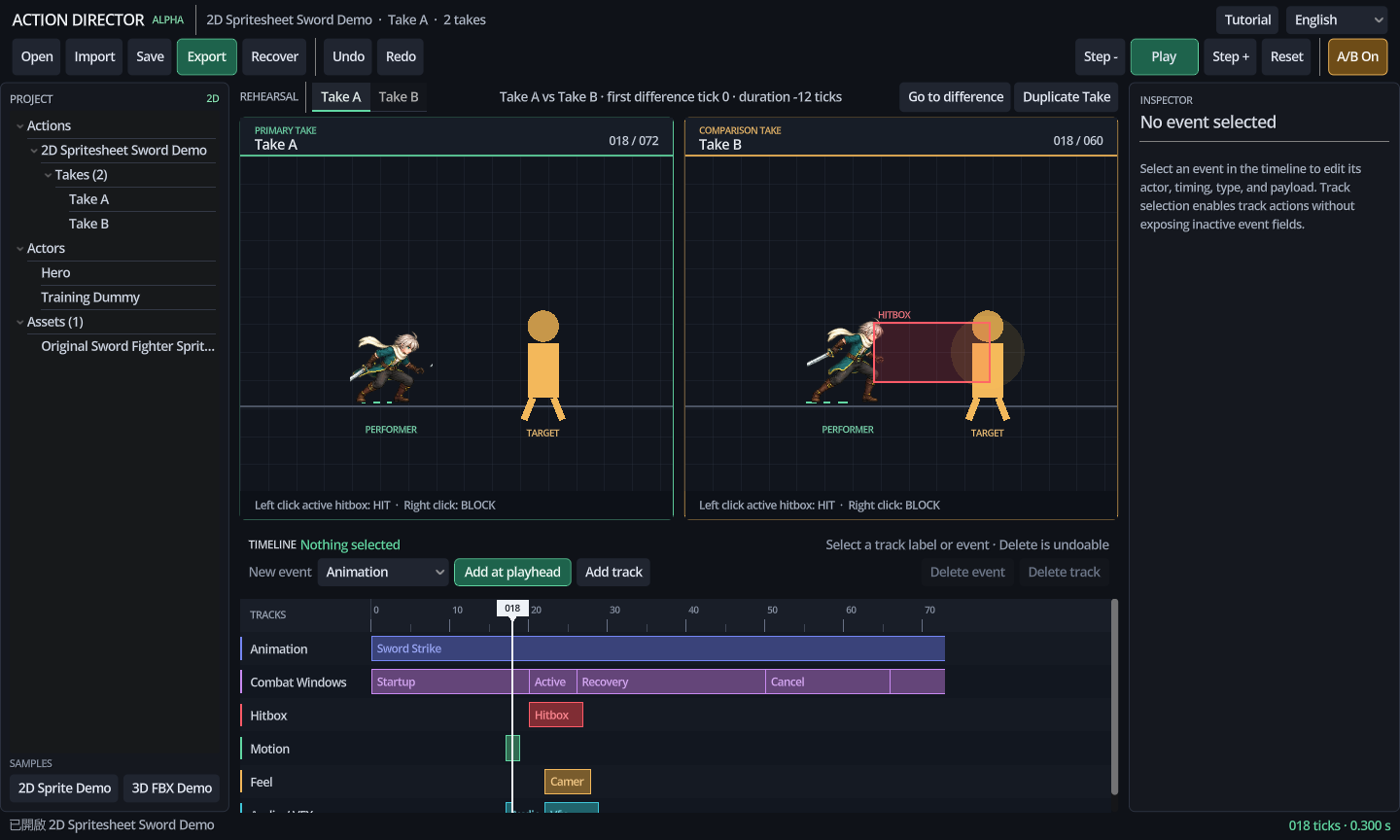
Take A and Take B run at the same playhead. The editor shows the first timing or payload difference and lets you jump to it.
You stop hunting through scripts
The animation event, active frames, movement, hit stop, sound, VFX, camera request, and cancel window sit on the same timeline.
The approved timing stays readable
The editor exports a plain .action.json. Commit it with the game and review timing changes as text instead of a binary resource diff.
The preview has a route into the game
The Godot addon reads the same ActionSpec and emits requests to your existing combat code. You do not rebuild a reference video by hand.
Use it when the move works but tuning it is slow.
Action Director is useful after you have animation or placeholder motion and before the action timing is settled. It supports 2D sprites and 3D models, but each action file stays in one dimension.
Good jobs for this tool
- Compare a safer slow attack with a faster risky one.
- Place a hitbox on the exact contact ticks.
- Check whether a dash, hit stop, sound, and camera shake agree.
- Give a programmer an exact event contract.
- Keep an AI-generated prototype from hiding timing across several scripts.
Jobs that stay in your game
- Damage, teams, collision results, and targets.
- Character state machines, AI, networking, and game rules.
- Drawing sprites or authoring skeleton animation.
- Skinning, IK, model editing, and automatic retargeting.
- Spawning the final production effects and audio.
Runtime boundary: hitboxes receive paired open and close signals. Cancel windows receive paired state changes. Hurtboxes and other windows currently fire a generic start event, so the game must schedule any matching close behavior it needs.
Download the Windows app or inspect the source.
These Alpha packages were rebuilt on August 13, 2026. The Godot 4.7 suite passes 31 of 31 tests, including packaged resource loading for both demos.
Windows x86_64 Alpha
Extract the zip, open the windows folder, and run ActionDirector.exe. Windows may show a reputation warning because this Alpha is not code-signed.
Full source package
Editor, runtime addon, four manuals, samples, schema, MIT license, and the test suite. Open the folder with Godot 4.7 stable.
Godot addon
Use this when the desktop app is already installed and you only need addons/action_director_runtime inside your game project.
macOS
The app builds locally on macOS, but the public package is intentionally withheld until Developer ID signing and Apple notarization are complete. Contributors can build the source with the included macOS Alpha export preset.
SHA-256 checksums · Browse the public source repository. The application itself is offline. This website uses the site's normal analytics and privacy policy; the downloaded app does not send telemetry.
Decide whether the tool helps you in ten minutes.
- Run the included 2D demo.
Open 2D Sprite Demo and press Space. Both takes use the same eight-frame sword animation, but they reach contact at different times.
- Pause at tick 18.
Take B has opened its hitbox while Take A is still preparing. Press , or . to inspect the change one tick at a time.
- Jump to the first difference.
Use Go to difference, then select the highlighted timeline event. The Inspector shows the exact tick range and payload.
- Duplicate a take.
Change one decision in the copy, such as startup or hitbox timing. Keep everything else unchanged so the comparison answers one question.
- Try the 3D path.
Open 3D FBX Demo. The included CC0 character has a real skeleton, mesh, and animation clips, so this is the same model-loading route used for Mixamo FBX.
- Export the result.
Save the workspace as
.adproject, then export.action.json. The JSON is the file you commit and hand to the Godot addon.
If that comparison does not save you time, the tool is probably not useful for your current project. If it does, open Tutorial > Full guide for the searchable offline manual.
Using a Mixamo character or motion.
Godot 4.7 includes a UFBX import path, so Action Director can read Mixamo FBX files directly. Blender is not required for this import step.
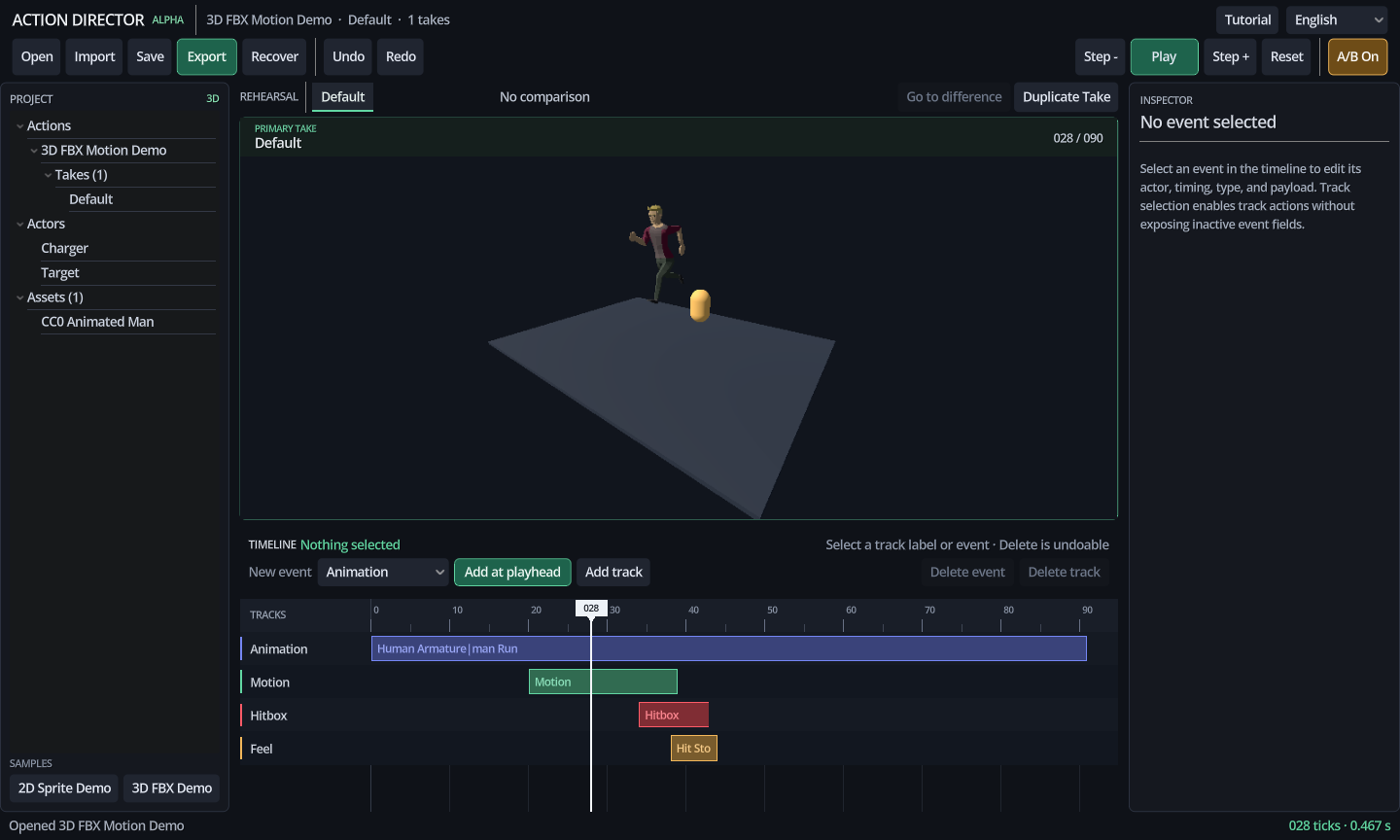
1. Try the bundled compatibility demo. Open 3D FBX Demo to see a real CC0 humanoid, skeleton, mesh, and eleven clips using the same UFBX path. It is redistributable and is not an Adobe or Mixamo asset.
2. Download correctly from Mixamo. Sign in with your own Adobe ID, choose FBX Binary, and use With Skin when the file should contain the character mesh, skeleton, and motion together. A 30 FPS download is fine because Action Director stores game events at 60 ticks independently of the source clip's display rate.
3. Save your Action Director project first. Then choose Import Asset and select the .fbx. The original file is copied into your project; it is not converted destructively.
4. Check the import summary. A usable character file should report at least one skeleton, one mesh, and one animation clip. The first imported 3D model replaces the preview proxy.
5. Match the clip name. Put the imported animation name in the animation event payload. If the authored name is not found, the Alpha can fall back to the first available clip and reports that recovery instead of failing silently.
6. Know the boundary. Adobe allows Mixamo content inside games and other projects, but raw Mixamo source files are not bundled or redistributed here. Automatic retargeting between unrelated skeletons is not implemented.
Move the same action into a Godot game.
- Extract the addon package into your Godot 4.7 project so the path is
res://addons/action_director_runtime/. - Enable Action Director Runtime under Project Settings → Plugins.
- Keep the exported
.action.jsonas source of truth. Import it as anActionSpecor generate a local.trescache. - Add
ActionDirectorPlayerand the correct 2D or 3D actor adapter. Connect the requests your game actually handles.
player.play(action_spec, "Take A", {"grounded": true})
player.report_outcome(event_id, "hit")
player.request_cancel("special")

player.event_fired.connect(_on_action_event)
player.hitbox_opened.connect(_open_attack_shape)
player.hitbox_closed.connect(_close_attack_shape)
player.motion_requested.connect(_apply_requested_motion)
The player emits requests. Your existing combat code decides whether a hit connects, how much damage it deals, whether the character may change state, and how production assets are spawned.
How it fits into real development work.
After AI writes the rough combat code
An AI assistant can build a state machine quickly, but asking it to rewrite several scripts for every two-tick adjustment creates noisy diffs. Move the action timing into ActionSpec and let the assistant work against that contract.
When you work alone
Keep Take A and Take B instead of replacing numbers in place. A month later, the JSON still shows why the selected version reaches farther or recovers later.
When design hands timing to code
Send exact ticks, event types, and payloads. The programmer connects those requests to the existing state machine instead of measuring a video and guessing what was intended.
For a 2D attack
Play the sprite frames beside the hitbox and movement tracks. If the red box appears before the sword reaches the target, fix the event timing without redrawing the animation.
For a 3D attack
Preview a GLB, glTF, or FBX clip while keeping the gameplay hitbox separate from the bone animation. Mixamo files with a character and motion can enter through Godot's UFBX importer.
During code review
Review .action.json as timing decisions. A change from tick 20 to tick 15 is visible without opening the editor or inspecting a binary Godot resource.
Update log
Every Action Director program change must update the source CHANGELOG.md in the same work unit. The public log below summarizes the current package and work already completed for the next package.
Unreleased
Current source and website package- Added graphical creation and deletion for animation, combat window, hitbox, hurtbox, motion, feel, audio, VFX, camera, game event, and note tracks/events.
- Inspector now edits event type and actor as well as tick range and payload.
- Added dimension-safe default payloads for 2D and 3D shapes.
- Take duplication now participates in complete undo/redo and regenerates all structural IDs.
- Reworked the desktop UI hierarchy: a two-row workspace/transport bar, green-versus-amber A/B stages, direct first-difference navigation, contextual timeline delete actions, and a purposeful empty Inspector.
- Timeline zoom now expands the scrollable canvas instead of clipping later ticks, while current selection and playhead timing remain visible.
- Added a redistributable CC0 humanoid FBX demo with a skeleton, mesh, eleven clips, and explicit source/license records; raw Mixamo files are not bundled.
- Added an original, redistributable CC0 eight-frame 2D sword spritesheet and tick-driven frame slicing, giving the app real 2D and 3D demonstrations.
- Updated the four in-app tutorials and complete manuals to match the graphical authoring process.
- Added a reproducible real-interface capture for this public page.
- Godot 4.7 test suite: 31/31 passing, including exported-PCK resource loading for both bundled demos.
0.1.0-alpha
August 13, 2026- First vertical slice of the offline editor and runtime addon.
- 2D sword and 3D charge samples with synchronized Take A/B rehearsal.
- Fixed 60-tick ActionSpec, forward-only outcome branches, autosave, recovery, and JSON export.
- PNG, WebP, WAV, OGG, GLB, glTF, and Mixamo FBX asset ingestion.
- English, Traditional Chinese, Japanese, and Korean interface, tutorial, and complete offline manual.
What comes next, and what stays outside the tool.
Action Director is useful only if it shortens a real iteration loop. Try the Windows Alpha or inspect the source on GitHub, then tell us where the process still gets in your way.