


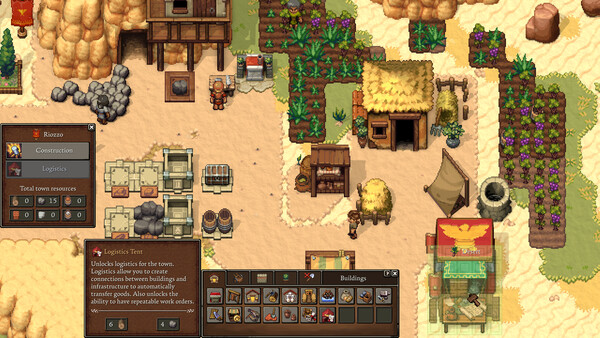
Match the transport method to the job. Carry a single heavy object when that finishes an immediate task. Use a cart or linked carts for a gathering load. Use Logistics Tent connections to feed production within a town, and Trading Posts for deliveries between towns.
Romestead's official description makes rocks, ores and logs physical objects. A full backpack is therefore not the same problem as a pile of heavy resources waiting outside your settlement.
Checked against official updates through October 3, 2026 (0.26.2_3); the credited May–June gameplay examples were not retested in the October build.
Use a cart when the load needs repeated trips
Suppose you have cut several trees for construction. Picking up one log after another and walking the whole route each time is the point at which a cart becomes useful. The game also supports linking carts into a train; Netto's launch review describes this alongside the tradeoff of carrying an object in your hands.
LifeofKino's June guide at 1:26 shows the cart-train approach and describes driving over loose resources to collect them. Start with enough carts for the load that actually fits.
Before a long gathering trip:
- Try collecting one loose log with your cart.
- Check that it was loaded before pulling away.
- Confirm you can unload it at the construction or storage destination.
- Then repeat with the larger load, adding linked carts if useful.
This small test checks the actual cart and controls in your build. It also avoids mistaking a failed pickup for resources disappearing somewhere along the route.
Throwing can shorten the final few steps
In LifeofKino's June example at 1:53–2:18, he aims the cursor over a cart or Material Storage and throws a held object into it. His keyboard bindings use Space to lift or put it down and right-click to throw.
Check your current bindings and try one object at close range before unloading the rest.
Let town production supply the next job
Once the same town produces a resource repeatedly, a logistics connection can remove the need to collect every output yourself.
The Logistics Tent became a reward for defeating Guardian of Minerva in the June 1, 2026 hotfix. Its purpose is to make automation available earlier.
A concrete starting example is a Quarry supplying Material Storage. Igarashi's June 0.25.1_12 walkthrough shows opening Logistics from the Tent or Workbench, dragging the Quarry's red output to the storage's green input, selecting repeating and resources, then saving. The screenshot documents that version's interface; follow the corresponding labels in your current build.
That gives you one route to inspect: Quarry output → Material Storage. For a crafting ingredient, the September 2 0.26.1_4 patch adds another important option: a connected crafter can take items from Material Storage. Older claims that workshop ingredients always require personal delivery are too broad.
The August 31 update also gave Material Storage a never-full drop-off zone. Check the storage needed by the next step separately.
Moving between towns needs a different setup
A town's Logistics Tent and an inter-town Trading Post route answer different problems. The developer introduced the Trading Post specifically for moving resources between settlements.
In Jade PG's June demonstration at 13:16, both towns have Trading Posts and suitable Material Storage. He selects the source and destination, specifies the cargo, and assigns a citizen carrier. Start with a small delivery and check its arrival before scheduling a large shipment.
If a route sits at loading or unloading, check the selected cargo, destination storage and carrier rather than immediately tearing down the post. A June 3 official fix prevents starving citizens from being used as carriers.
The June video includes canceling and rebuilding a troublesome Trading Post. That is not a good default instruction for a newer save. September's patch specifically says a canceled route will drop cargo outside the Trading Post if a normal deposit fails. Check that location after such a cancellation; it is a different case from an active route still trying to unload.
When a delivery still fails
Identify the failing part before changing the settlement:
- Cart problem: test pickup and unloading with one object. The Autumn update fixed a specific Bronze Cart cliff-fall bug.
- Production output problem: inspect the connection and destination. A narrow June 10 hotfix fixed logistics from claypits and lumberyards and warned that affected buildings might require rebuilding. Keep that remedy tied to the named legacy fault.
- Ingredients arrive but crafting stops: check the recipe, artisan, fuel and queue. The crafting-station guide follows those checks.
- Co-op deliveries look delayed: check the connection-quality indicator. Network improvements and warnings shipped in the stable Autumn update; older beta-only descriptions are out of date.
The next useful upgrade is the one that handles your actual load: a cart for a gathering run, a connection for recurring town production, or a trade route for another settlement.
Sources & research
Sources checked October 3, 2026. The dated creator examples and their version limits are identified in the guide.
- official description ↗
- 0.26.2_3 ↗
- Netto's launch review ↗
- LifeofKino's June guide at 1:26 ↗
- LifeofKino's June example at 1:53–2:18 ↗
- June 1, 2026 hotfix ↗
- June 0.25.1_12 walkthrough ↗
- 0.26.1_4 patch ↗
- August 31 update ↗
- Trading Post ↗
- Jade PG's June demonstration at 13:16 ↗
- June 3 official fix ↗
- June 10 hotfix ↗